Start Installer
Executes an installer.
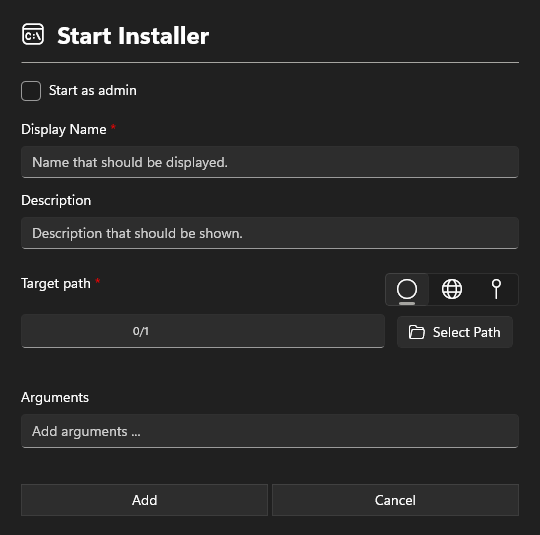
Settings section
Start as Admin
Starts the software as an administrator. If no administrative rights are available, the standard Windows credentials prompt will appear.
Information section
Display Name
Add an Displayname. This name will show in the Run Install Packages.
Description
The description is also displayed in the Run Install Packages and may contain information about the software.
Target Path
Defines the installer to be executed.
Only .exe, and .msi files can be specified.
Arguments
Depending on the installer, different arguments may be required. This varies by manufacturer. For Autodesk, the most common arguments are listed below:
Install mode for deployments
Start the installation in a minimal window. This way, the progress is visible, but the process runs unattended.
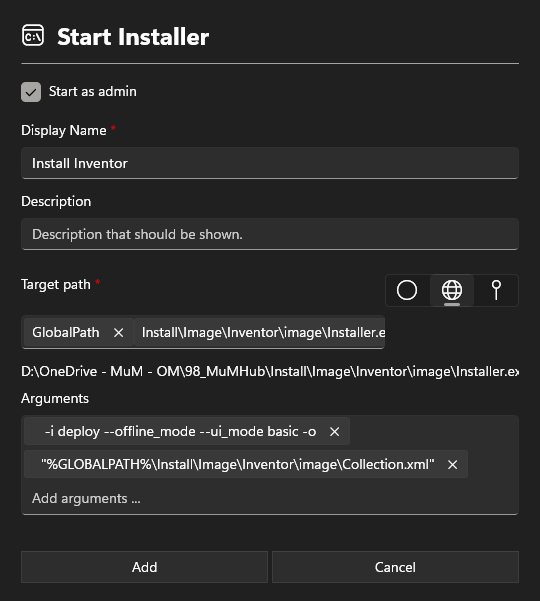
-i deploy --offline_mode --ui_mode basic -o
Start the installation without a visible window. This allows the installation to run unattended without displaying any progress.
-i deploy --offline_mode -q -o
If you need to provide a file as an argument that is located in the installation directory of MuM.Access.Hub, you can use the variable %GLOBALPATH% to reference the global path from the settings.
This changes the path from
"I:\MuM\2026\Install\Image\ACAD\image\Collection.xml"
To
"%GLOBALPATH%\Install\Image\ACAD\image\Collection.xml"
Install mode for installer
Starts downloading the image in quiet mode.
-q
The installation cannot be started automatically. User intervention is always required in this case.
An example of an Autodesk deployment package with arguments: